UV Vis Lanthanide Spectroscopy Software


UV Visible Spectra of lanthanide complexes can be calculated from Sparkle Model optimized geometries, followed by ORCA calculations, in which the lanthanide ion is replaced by a +3e point charge.

The required citation, where this procedure has been first described, is:

Theoretical model for the prediction of electronic spectra of lanthanide complexes

Antonio V. M. de Andrade, Ricardo L. Longo, Alfredo M. Simas and Gilberto F. de Sá
J. Chem. Soc., Faraday Trans., 1996, 92, 1835 - 1839.


Tutorial


  1. To perform this task you will need the following softwares: Gabedit, MOPAC2009, ORCA, and a text editor of your preference (Notepad, Textpad, etc.).

     
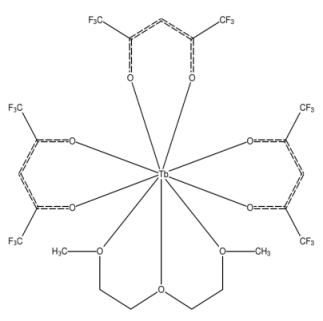
  2. As an example, let us consider the complex CCSD: BAFWUB [(Diglyme)-tris(hexafluoroacetylacetonato)-terbium(iii)], below:

    bafwub terbium fluorine acetylacetonato

     
  3. First draw the geometry of your complex following the instructions in Drawing Complexes.

     
  4. After optimizing the geometry of the complex, according to the instructions in Drawing Complexes, please right click on the black screen of the "Gabedit: Draw Geometry" window, go to "Read" > "Mopac" > "Last geometry from a Mopac output file" and open the ".out" MOPAC output file. As an example, we provide bafwub.out.
     
  5. Close the "Gabedit: Draw Geometry" window. From the main menu of Gabedit, click on the "New Orca input file" icon orca icon gabedit. A new window, called "Orca input", appears.

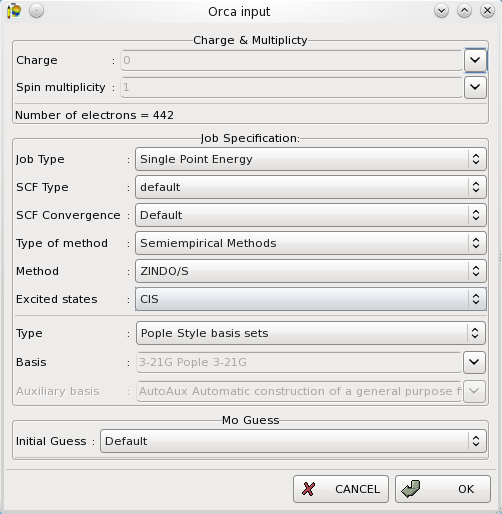
     
  6. In the "Orca input" window, go to "Type of method" option, and select "Semiempirical Methods". Then, go to the "Excited states" option and select "CIS". Click OK.

    gabedit orca input
     
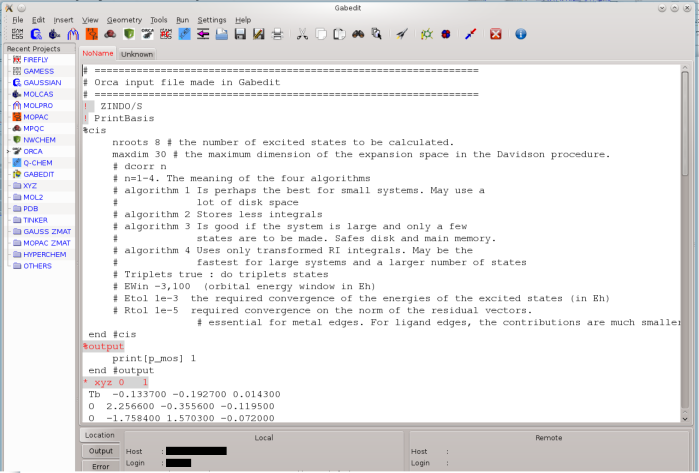
  7. The ORCA input will appear in the main window of Gabedit.

    gabedit orca editor lanthanide complexes

     
  8. Find and cut the line containing the lanthanide atom coordinates in the ORCA input editor. Now paste that line in the text editor of your preference. Replace the lanthanide symbol by 3.0. Add one line above this line in the text editor with the number of point charges. For example, if your complex has only one lanthanide atom, then set this number to 1 (example below). Save the file, with a name of your preference, in a specific folder of your choice (you may even create a new folder for this purpose) and close the file.  Please, write down the name of this folder, you will need this information in item 15, below.
     
  9.     
    1
     3.0 -0.133700 -0.192700 0.014300
        
        
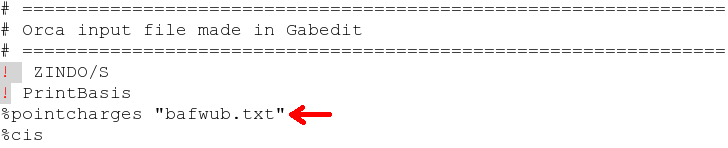
  10. Go to Gabedit again, add the line %pointcharges "file_containing_point_charges.txt" below of the line ! PrintBasis, where file_containing_point_charges.txt is the previous file. As an example, for convenience, we provide bafwub.txt.
     
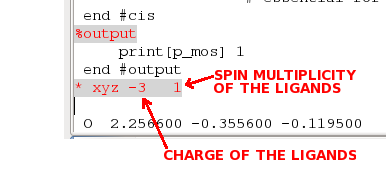
  11. IMPORTANT: Replace the total charge of the lanthanide complexes by the charge of the ligands.
    Why?
    Because, we eliminated the lanthanide ions and replaced them by points of charge +3.
    Therefore, ORCA will compute the ligands only, in the presence of these point charges. And, consequently, we have to tell ORCA the charge of the ligands.
    Thus, the sum of the charge of the ligands plus the sum of the point charges, must be equal to the charge of the complex.
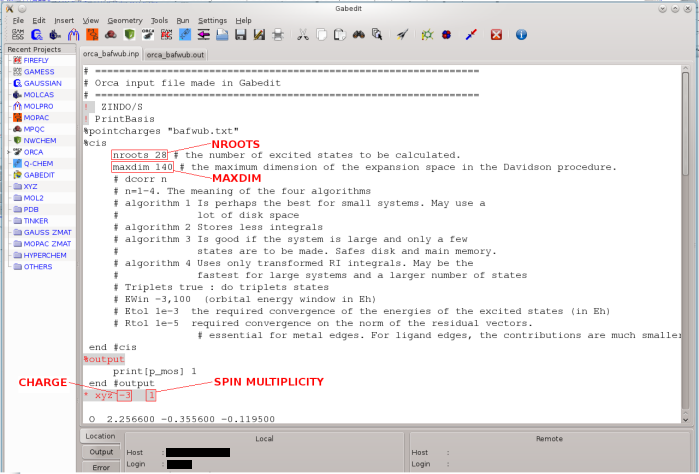
    For example, the total charge of the BAFWUB complex is 0. Since we replaced only one lanthanide by a charge of +3, the ligands must now have a total charge of -3. Therefore, we have to set, as the charge of the species being calculated charge -3.
     
  12. In the Gabedit editor, the charge of the system is indicated in the figure below:

    gabedit orca spin charge

    Figure detail:

    gabedit orca charge ligands
     
  13. Now, you must choose nroots, the number of excited states to be calculated for the ligands in the presence of the point charges. The predicted absorption spectrum is highly dependent on this parameter. As it increases, the number of peaks in the spectrum will also increase, due to the inclusion of new possibilities of excitations being considered. For this complex, we chose nroots to be 28.
     
  14. Finally, you must choose the excitation window which is controlled by parameter EWin, the orbital energy window in Hartrees. The larger this window, the lower will be the excitation energies, and the spectrum will tend to be displaced towards smaller frequencies. For this complex, we chose the GABEDIT default value of -3,100. If you prefer to modify its values, remove the # sign in front of it (uncomment)and set your chosen values.
     
  15. IMPORTANT: Make sure that Gabedit is properly configured to run ORCA:
    On UNIX like systems (Linux, MacOS X, ...): Make sure that your PATH variable contains a reference to the directory of ORCA binary files.
    On Windows: Run Gabedit. From the drop-down menu "Settings", select "Preferences". A periodic table will appear. Now, choose the "Commands" tab. Make sure that in the line which says "Command for execute Orca", appears the correct path where the orca.exe file is.
     
  16. Now run ORCA. Click on the "Run a abtinio program"(sic) icon. A new window, called "Run", appears.
     
  17. In the "Run" window, go to "Folder" option, and select the same folder you used in item 8 above . Then, go to the "Save data in file " option and choose a name for the file, which will automatically have extension .inp. As example, we provide orca-bafwub.inp. Click OK.
    OBS: If Gabedit returns an error message, please follow the instructions in item 14 above.
     
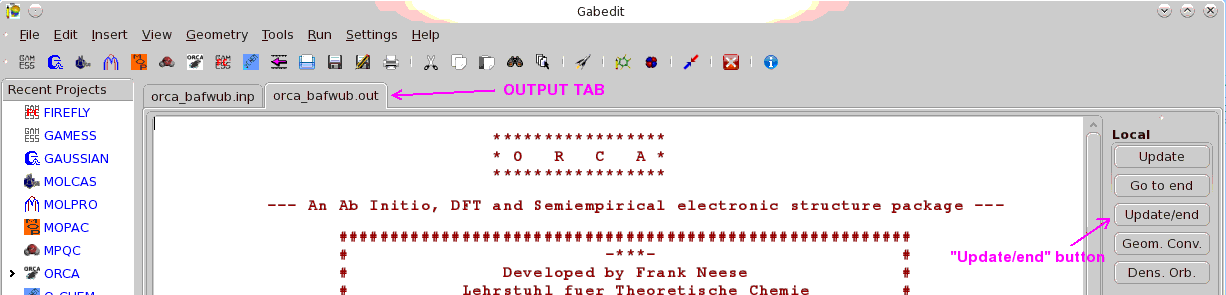
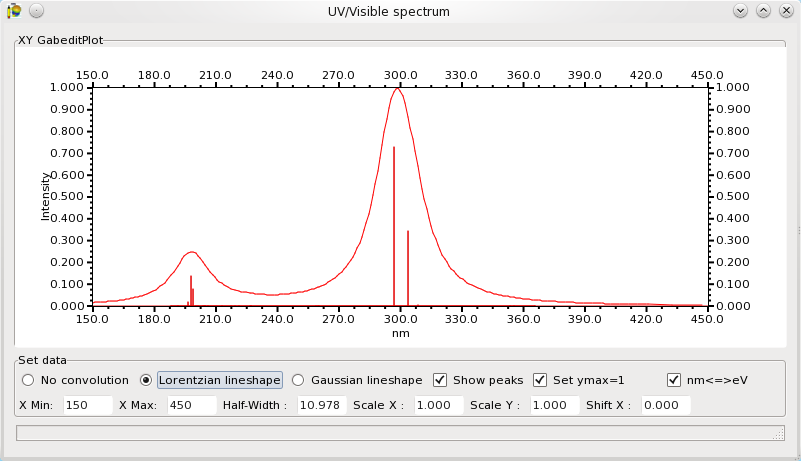
  18. For visualizing the spectrum, go to "Tools" > "UV spectrum" > "Read energies and intensities from a Orca output file", navigate to the same folder you used in items 8 and 15, and find the .out file produced by ORCA. It should have the same name of the .inp file saved in item 15 above. As example, we provide orca-bafwub.out. Click in "Open". The spectrum will be shown, as below.

    spectrum bafwub lanthanide uv-vis
     
  19. For better visualization, please choose the Set Data options as indicated above.

Acknowledgements
We are grateful to Sebastiaan Akerboom from Leiden University, Netherlands, for the suggestion of this tutorial.


UV Visible Spectra of lanthanide complexes can be calculated from Sparkle Model optimized geometries, followed by ZINDO calculations, in which the lanthanide ion is replaced by a +3e point charge.

The required citation, where this procedure has been first described, is:

Theoretical model for the prediction of electronic spectra of lanthanide complexes

Antonio V. M. de Andrade, Ricardo L. Longo, Alfredo M. Simas and Gilberto F. de Sá
J. Chem. Soc., Faraday Trans., 1996, 92, 1835 - 1839.


Tutorial


  • To perform this task you will need the following softwares: MOPAC2009, ZINDO, and a text editor of your preference (Notepad, Textpad, etc.).


  • We assume you are familiar with ZINDO and know how to prepare ZINDO input data files. Since all lanthanide complexes to be calculated are closed shell molecules, this tutorial deals with this situation only.


  • As an example, let us consider the complex CCSD: BAFWUB [(Diglyme)-tris(hexafluoroacetylacetonato)-terbium(iii)], below:

    bafwub terbium fluorine acetylacetonato


  • First draw and optimize the geometry of your complex following the instructions in Drawing Complexes. You should now have the corresponding mop file. As an example, we provide the bafwub.mop


  • After optimizing the geometry of the complex, you will need to convert the .out file, bafwub.out, generated by MOPAC2009 into the ZINDO input file using your favorite text editor. The .out file is preferred because ZINDO requires geometries in cartesian coordinates, and the .out file always has the cartesian coordinates of the complexes of lanthanides.


  • Build the ZINDO input file. It is composed of four parts: $TITLEI, $CONTRL, $DATAIN, and $CIINPU. Let us address each of these parts individually:


  • $TITLEI      


  •     
        $TITLEI
                                                     
         Here you write whatever you want. For example, the CCSD code for this complex is: BAFWUB 
    
        $END


  • $CONTRL


  •     
     $CONTRL
     
     SCFTYP=RHF   RUNTYP=CI   ENTTYP=COORD   UNITS=ANGS
     ONAME=        IPRINT=0
     NEL= 284   MULT=1   ITMAX=50
     SCFTOL=0.000001   APX=INDO/1   INTTYP=1
     INTFA(1)= 1.0  1.267  0.585  1.0  1.0  1.0
     CISIZE= 3601   ACTSPC= 202
     
     $END


    In $CONTRL you need to change only ONAME, NEL, CISIZE and ACTSPC.

    ONAME is a path of a temporary file. Any valid path will work.

    NEL is the number of electrons in the complex. For a closed shell complex, NEL will be twice the number of doubly occupied levels, present in the MOPAC .out file, ex:
    RHF CALCULATION, NO. OF DOUBLY OCCUPIED LEVELS = 142

    CISIZE is the size of the CI matrix you expect to generate, and may be calculated as: the number of occupied orbitals in the excitation window, times the number of unoccupied orbitals in the excitation window plus one. The number of occupied and unoccupied orbitals of the excitation window will be defined below in the $CIINPU part.

    ACTSPC is the last orbital in the CI window.

  • $DATAIN

  • Here you should copy the cartesian coordinates of the atoms in the complex, as they appear in the MOPAC .out file and transform them into ZINDO input (free format) as follows:

    MOPAC .out geometry:

          
               1      Tb         -0.13371567  *  -0.19270501  *   0.01427100  *
               2       O          2.25656822  *  -0.35558383  *  -0.11950609  *
               3       O         -1.75839037  *   1.57025431  *  -0.07199136  *


    Which should become:


           $DATAIN
           
           -0.133715670   -0.192705010    0.014271000      0   3.00
            2.256568220   -0.355583830   -0.119506090      8
           -1.758390370    1.570254310   -0.071991360      8
    
           ...
    
           $END


    Please, notice that we replaced the lanthanide by a +3e point charge. Instead of placing the lanthanide atomic number in the fourth column (after the x,y,z), we typed 0. Then added, a fourth column, 3.00.

  •  $CIINPU

  • This part of the input is formatted. Be careful with the positions of the data


           $CIINPU
              4    1  100    1    0    0    0    1    1    1  100
            -60000.0  0.000000  0.000000
              0    0    0    0    0    0    0    0    0
              1  142  142
             21   83  142  143  202
           $END


    Here, only the last two lines need to be changed.

    Let us consider the penultimate line: 1 142 142. Do not change the first number 1; the second and third numbers are identical for closed shell molecules, in this case 142. They are the number of the last occupied orbital in the molecule, present in the MOPAC .out file, as: RHF CALCULATION, NO. OF DOUBLY OCCUPIED LEVELS = 142.

    Consider now the last line. Five numbers appear, in this case: 21 83 142 143 202. The first number must not be changed. The second number is the lowest occupied orbital in the excitation window. In this case we chose 83. The third number, 142, is the HOMO. The fourth number, 143, is the LUMO. Finally, the fifth number, 202, is the last unoccupied orbital included in the excitation window.

    That is it. For your convenience, we provide the ZINDO input file bafwub_sing.inp.

    Get the frequencies and the oscillator strengths from the ZINDO output .zin file. For your convenience, we provide  bafwub_sing.zin.


  • Frequencies and Intensities


  • ZINDO output files are long and complex. Fortunately, we only need to find a part of it which looks like:

          
           _____________________________________________________________________________
      
              TRANSITION           ENERGY      OSC. STRENGTH     TRANSITION MOMENT
           -----------------------------------------------------------------------------
           -----------------------------------------------------------------------------
           (    1)-->(    2)    29673.4 CM-1        0.00004      X      0.00189152
                                  337.0 NM                       Y     -0.04924651
                                                                 Z     -0.02567895
           -----------------------------------------------------------------------------
           (    1)-->(    3)    30675.0 CM-1        0.00003      X      0.02565147
                                  326.0 NM                       Y      0.03305940
                                                                 Z      0.00754372
           -----------------------------------------------------------------------------
           (    1)-->(    4)    30807.5 CM-1        0.00004      X     -0.03832270
                                  324.6 NM                       Y     -0.01901276
                                                                 Z     -0.03531046
           -----------------------------------------------------------------------------
           (    1)-->(    5)    34898.0 CM-1        0.00762      X      0.57142851
                                  286.5 NM                       Y      0.07436793
                                                                 Z     -0.36267691
           -----------------------------------------------------------------------------
           (    1)-->(    6)    35417.2 CM-1        0.38993      X     -3.73408804
                                  282.3 NM                       Y      2.98911992
                                                                 Z      0.70771650
           -----------------------------------------------------------------------------
           (    1)-->(    7)    36208.1 CM-1        0.81584      X      3.99215648
                                  276.2 NM                       Y      4.38325693
                                                                 Z      3.56322913
           -----------------------------------------------------------------------------
           (    1)-->(    8)    42477.6 CM-1        0.00010      X     -0.05041154
                                  235.4 NM                       Y     -0.03903970
                                                                 Z     -0.02857051
           -----------------------------------------------------------------------------


    In this case, in order to generate the UV-Vis spectrum of the complex, we need a table with two columns: the frequencies, in the above case, 337.0 NM, 326.0 NM, etc, and the corresponding intensities: 0.00004, 0.00003, etc.


  • Generating the Spectrum


    The spectrum can be generated assuming a bandwwidth of 25nm, unless you have a more accurate idea of this value, based on experimental data. We recommend using the van Vleck-Weisskopf lineshape, where γ is the bandwidth, ν0 is the ZINDO computed frequency, and ν is the incident radiation frequency. For each incident frequency, the lineshapes for each ν0 must be multiplied by the corresponding intensity and summed up. Then, transform the frequencies into wavelength (nanometers). For your convenience, we provide the bafwub_spec.out which lists the wavelengths and the respective spectrum intensities, ready to be plotted.
  • Below, we present the plotted lanthanide complex calculated UV VIS spectrum of BAFWUB.

    bafwub uv vis spectrum lanthanide